

COSMO
COSMO Connect provides user, profile, and access permission management through a custom Make app. It allows you to create and update users, assign time‑bound access permissions, and search or list profiles, sites, and users. When used in Make scenarios, this app centralises access-control workflows, including onboarding/offboarding users, granting temporary access, and auditing who has access to what.
 Prerequisite: This document assumes that you already have a basic knowledge of using the Make platform.
What COSMO modules are available in the Make platform
- User – Create a User, Update a User, Get a User, Delete a User, Search Users, Get a User Outcode
- Permission – Create Access Permission, Update Access Permission, Delete a Permission, Search Access Permissions, Get an Access Permission
- Groups - Get a Group, Create a Group, Update a Group
- Profiles – Get a Profile, List all Profiles
- Sites - List all Sites
- Other – Make an API Call
Connecting COSMO to Make
To use COSMO in Make, you’ll need both your Registered BPT App License Key and an authorized COSMO instance with valid login credentialsHow do I request a BPT App License Key
After purchasing your app either as part of a bundle or separately, you should have received an email containing the BPT App License Key. If you have not received an email or if you are yet to purchase the app please use the Frequently Asked Questions that will guide you through the process.
How to Create a connection for your Make module
- To establish the connection in Make, insert a COSMO module into a scenario. Under Connection, click “Create a connection”.
- The Create a Connection dialog appears.
- In the Connection name field, enter a name to identify the connection.
- Enter your Registered BPT App License Key.
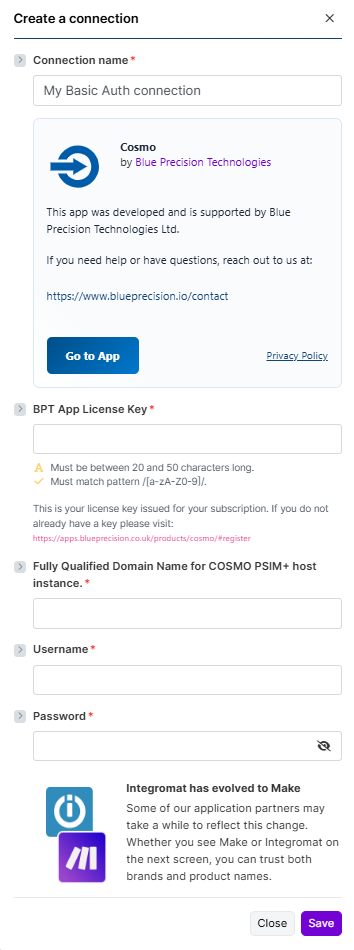 For more information on how to acquire a BPT App License Key, refer to the
FAQ
page.
For more information on how to acquire a BPT App License Key, refer to the
FAQ
page.Enter COSMO Domain Name for example,
http://blueprecision.cosmo.com/accessinputblueprecision.cosmo.comas the domain name.Input Username and Password for COSMO
Click Save.
Build COSMO Scenarios
After connecting the app, you can perform the following actions:
Permission
Get an Access Permission
Retrieve a single access permission by its ID.
This module contains the following fields
| Field | Description |
|---|---|
| Connection | Select the required connection from the drop‑down. If no connection exists, create a Connection. |
| Permission ID * | The unique identifier of the permission to retrieve. (Required) |
Create Access Permission
Create a new access permission for a user and profile within a date range.
This module contains the following fields
| Field | Description |
|---|---|
| Connection | Select the required connection from the drop‑down. If no connection exists, create a Connection. |
| User ID * | Identifier of the user to assign the permission to. A search button allows you to look up the user using First Name and Surname. (Required) |
| Profile ID | Select the profile to associate with the permission. |
| Start Date * | Start date and time for the permission. Implemented as a collection of Date and Time fields. (Required) |
| End Date * | End date and time for the permission. Implemented as a collection of Date and Time fields. (Required) |
Update Access Permission
Update an existing access permission, including user, profile, and date range.
This module contains the following fields
| Field | Description |
|---|---|
| Connection | Select the required connection from the drop‑down. If no connection exists, create a Connection. |
| Permission ID * | The unique identifier of the permission to update. (Required) |
| User ID * | Identifier of the user associated with the permission. Includes a search button to look up the user by First Name and Surname. (Required) |
| Profile ID | Select the profile to associate with the permission. |
| Start Date * | Updated start date and time for the permission (collection of Date and Time). (Required) |
| End Date * | Updated end date and time for the permission (collection of Date and Time). (Required) |
Delete a Permission
Delete an existing access permission by its ID.
This module contains the following fields
| Field | Description |
|---|---|
| Connection | Select the required connection from the drop‑down. If no connection exists, create a Connection. |
| Permission ID * | The unique identifier of the permission to delete. (Required) |
Search Access Permissions
Search access permissions using multiple filters such as permission ID, user, profile, and limit.
This module contains the following fields
| Field | Description |
|---|---|
| Connection | Select the required connection from the drop‑down. If no connection exists, create a Connection. |
| Permission ID | Filter by permission ID. |
| User ID | Filter by user. A search button allows you to look up the user using First Name and Surname. |
| Profile ID | Filter by profile. |
| Limit | Maximum number of returned results (bundles). Default is 10. |
User
Create a User
Create a new user in the COSMO system.
This module contains the following fields
| Field | Description |
|---|---|
| Connection | Select the required connection from the drop‑down. If no connection exists, create a Connection. |
| First Name * | User’s first name. (Required) |
| Surname | User’s surname. |
| Email Address * | User’s email address. (Required) |
| Phone Number | User’s phone number. |
| Profile ID | Select the profile to assign to the user. |
| Group ID | Select the group to assign to the user. |
| Activation Date * | Date from which the user becomes active. (Required) |
| Expiry Date | Optional expiry date for the user. |
| Set Active * | Indicates whether the user should be active. Defaults to false. (Required) |
| Incode | Optional Incode associated with the user. |
Update a User
Update an existing user’s details and status.
This module contains the following fields
| Field | Description |
|---|---|
| Connection | Select the required connection from the drop‑down. If no connection exists, create a Connection. |
| User ID * | The unique identifier of the user to update. (Required) |
| First Name * | User’s first name. (Required) |
| Surname * | User’s surname. |
| Email Address * | User’s email address. (Required) |
| Phone Number | User’s phone number. |
| Profile ID | Select the profile to assign to the user. |
| Group ID | Select the group to assign to the user. |
| Activation Date * | Date from which the user becomes active. (Required) |
| Expiry Date * | Optional expiry date for the user. |
| Set Active * | Indicates whether the user should be active. Defaults to false. (Required) |
| Incode | Optional Incode associated with the user. |
Get a User
Retrieve a single user by their ID.
This module contains the following fields
| Field | Description |
|---|---|
| Connection | Select the required connection from the drop‑down. If no connection exists, create a Connection. |
| User ID * | The unique identifier of the user to retrieve. (Required) |
Delete a User
Delete an existing user by their ID.
This module contains the following fields
| Field | Description |
|---|---|
| Connection | Select the required connection from the drop‑down. If no connection exists, create a Connection. |
| User ID * | The unique identifier of the user to delete. (Required) |
Search Users
Search users using multiple filters such as ID, name, email, phone, profile, group, and limit.
This module contains the following fields
| Field | Description |
|---|---|
| Connection | Select the required connection from the drop‑down. If no connection exists, create a Connection. |
| User ID | Filter by user ID. |
| Name | Filters by first name or surname (contains). |
| Filters by Email (contains). | |
| Phone Number | Filters by Phone Number (contains). |
| Profile ID | Filter by profile. |
| Group ID | Filter by group. |
| Limit | Number of results to return. Defaults to 10. |
Get a User Outcode
Retrieve a user’s outcode using their user ID and incode.
This module contains the following fields
| Field | Description |
|---|---|
| Connection | Select the required connection from the drop‑down. If no connection exists, create a Connection. |
| User ID * | The unique identifier of the user. (Required) |
| Incode * | The incode value used for the lookup. (Required) |
Groups
Get a Group
Retrieve a single group by its ID.
This module contains the following fields
| Field | Description |
|---|---|
| Connection | Select the required connection from the drop‑down. If no connection exists, create a Connection. |
| Group ID * | The unique identifier of the group to retrieve. (Required) |
Create a Group
Create a new group in COSMO.
This module contains the following fields
| Field | Description |
|---|---|
| Connection | Select the required connection from the drop‑down. If no connection exists, create a Connection. |
| Description * | Description for the group. (Required) |
Update a Group
Update an existing group in COSMO.
This module contains the following fields
| Field | Description |
|---|---|
| Connection | Select the required connection from the drop‑down. If no connection exists, create a Connection. |
| Group ID * | The unique identifier of the group to update. (Required) |
| Description * | Updated description for the group. (Required) |
Profiles
Get a Profile
Retrieve a single profile by its ID.
This module contains the following fields
| Field | Description |
|---|---|
| Connection | Select the required connection from the drop‑down. If no connection exists, create a Connection. |
| Profile ID * | The unique identifier of the profile to retrieve. (Required) |
List all Profiles
Returns a list of profiles available in COSMO.
This module contains the following fields
| Field | Description |
|---|---|
| Connection | Select the required connection from the drop‑down. If no connection exists, create a Connection. |
| Limit | Maximum number of returned results (bundles). Default is 10. |
Sites
List all Sites
Returns a list of sites available in COSMO.
This module contains the following fields
| Field | Description |
|---|---|
| Connection | Select the required connection from the drop‑down. If no connection exists, create a Connection. |
| Limit | Maximum number of returned results (bundles). Default is 10. |
Other
Make an API Call
Performs an arbitrary authorised API call.
This module contains the following fields
| Field | Description |
|---|---|
| Connection | Select the required connection from the drop‑down. If no connection exists, create a Connection. |
| URL * | Enter a path relative to https://{{connection.hostname}}. For example: /users. (Required) |
| Method * | Select the HTTP method you want to use: GET to retrieve information, POST to create a new entry, PUT to update/replace an existing entry, PATCH to make a partial entry update, DELETE to delete an entry. (Required) |
| Headers | Enter the desired request headers as key/value pairs. You don’t have to add authorisation headers; these are already included. A default Content-Type: application/json header is provided. |
| Query String | Enter the request query string as key/value pairs. |
| Body | Enter the body content for your API call. |