

By David Dallyn April 15, 2025
Nlyte NAO
With Nlyte NAO modules in Make, you can manage assets, locations, racks, devices, connections, workflows, tickets, power and energy data, audit logs, users, roles, permissions, and real-time monitoring of your data centre infrastructure, enabling streamlined automation and enhanced visibility across your Nlyte environment.
 Prerequisite: This document assumes that you already have a base knowledge of using the Make platform.
What Nlyte NAO modules are available in the Make platform
- Asset - Search Assets, Get an Asset, Create an Asset, Update Asset, Delete Asset
- Material - Search Material, Get a Material, Create a Material, Update Material, Delete a Material
- Servers - Search Server, Get a Server, Create Server, Update Server, Delete Server
- Cabinets - Search Cabinets, Get a Cabinet, Create Cabinet, Update Cabinets, Delete Cabinet
- Standard Server Materials - Search Standard Server Materials, Get a Standard Server Material, Create Standard Server Material, Update Standard Server Material, Delete Standard Server Material
- Blade Server Materials - Search Blade Server Materials, Get a Blade Server Material, Create Blade Server Material, Update Blade Server Material, Delete Blade Server Materials
- Cabinet Materials - Search Cabinet Material, Get a Cabinet Material, Create Cabinet Material, Update Cabinet Material, Delete Cabinet Material
- Other - Make an API Call
Connecting Nlyte NAO to Make
To use Nlyte NAO in Make, you’ll need both your Registered BPT App License Key and your Nlyte NAO username and password.To use the Nlyte NAO modules, you must have a Nlyte NAO account. You can create an account at nlyte.com .
Refer to the Nlyte NAO API documentation for a list of available endpoints.
How do I request a BPT App License Key
After purchasing your app either as part of a bundle or separately, you should have received an email containing the BPT App License Key. If you have not received an email or if you are yet to purchase the app please use the Frequently Asked Questions that will guide you through the process.
How to Create a connection for your Make module
- Login to Make > select Scenarios > select Create a new scenario.
- Search for Nlyte NAO and select any module you intend to use.
- Under Connection, click Create a connection.
- The Create a Connection dialog appears.
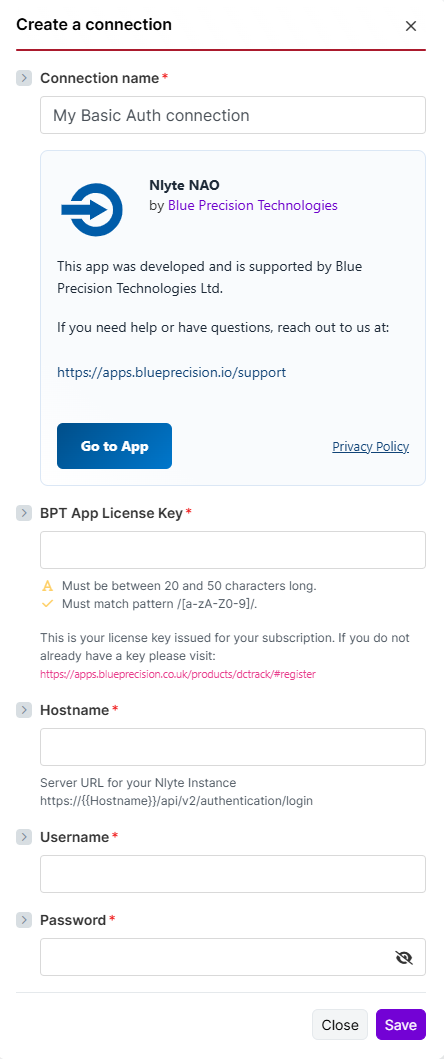
- In the Connection name field, enter a name to identify the connection.
- Enter your Registered BPT App License Key.
For more information on how to acquire a BPT App License Key, refer to the
FAQ
page.- Enter your Nlyte username and password.
- Enter your Nlyte hostname.
- Click Save.
 When using an internally hosted Nlyte NAO instance, Make must be able to reach it. Use ngrok or a similar tunnel if your Nlyte NAO environment is not publicly accessible.
You have successfully established the connection. You can now edit your scenario and add more Nlyte NAO modules. If your connection requires reauthorization at any point, follow the connection renewal steps here .
Build Nlyte NAO Scenarios
After connecting the app, you can perform the following actions:
Create and update module fields are dynamically loaded.Asset
Search Assets
Searches for assets.
This module contains the following fields
| Field | Description |
|---|---|
| Connection | Select or create the Nlyte NAO connection to use for this module. |
| Filter results | Build a Nlyte NAO search filter by selecting a field, choosing an operator, and entering the value to match. |
| Select Columns to Return | Choose the columns to return from the endpoint. Multiple columns can be selected. |
| Expand Field Data | Use OData query language to expand related field data. This is an advanced setting. |
| Order By | Select the column used to order the returned results. |
| Limit | Set the maximum number of returned results. |
Get an Asset
Retrieves a single asset.
This module contains the following fields
| Field | Description |
|---|---|
| Connection | Select or create the Nlyte NAO connection to use for this module. |
| Asset ID | Enter the identifier of the asset to retrieve. |
Create an Asset
Creates a new asset.
This module contains the following fields
| Field | Description |
|---|---|
| Connection | Select or create the Nlyte NAO connection to use for this module. |
| Asset Class | Select the asset class to create, such as Server, PDU, Cabinet, Network, UPS, Host, or Other. |
| Positioning | Provide positioning details for the asset, including U mounting information where applicable. |
Update Asset
Updates an existing asset.
This module contains the following fields
| Field | Description |
|---|---|
| Connection | Select or create the Nlyte NAO connection to use for this module. |
| Asset ID | Enter the identifier of the asset to update. This field is required. |
| Asset Class | Select the asset class to update, such as Server, PDU, Cabinet, Network, UPS, Host, or Other. This field is required. |
| Positioning | Provide positioning details for the asset, including U mounting information where applicable. |
Delete Asset
Deletes an asset.
This module contains the following fields
| Field | Description |
|---|---|
| Connection | Select or create the Nlyte NAO connection to use for this module. |
| Asset ID | Enter the identifier of the asset to delete. |
Material
Search Material
Searches for materials.
This module contains the following fields
| Field | Description |
|---|---|
| Connection | Select or create the Nlyte NAO connection to use for this module. |
| Filter results | Build a Nlyte NAO search filter by selecting a field, choosing an operator, and entering the value to match. |
| Select Columns to Return | Choose the columns to return from the endpoint. Multiple columns can be selected. |
| Expand Field Data | Use OData query language to expand related field data. This is an advanced setting. |
| Order By | Select the column used to order the returned results. |
| Limit | Set the maximum number of returned results. |
Get a Material
Retrieves a single material.
This module contains the following fields
| Field | Description |
|---|---|
| Connection | Select or create the Nlyte NAO connection to use for this module. |
| Material ID | Enter the identifier of the material to retrieve. |
Create a Material
Creates a new material.
This module contains the following fields
| Field | Description |
|---|---|
| Connection | Select or create the Nlyte NAO connection to use for this module. |
| Material | Provide the material details to create. |
Update Material
Updates an existing material.
This module contains the following fields
| Field | Description |
|---|---|
| Connection | Select or create the Nlyte NAO connection to use for this module. |
| Asset ID | Enter the identifier of the asset or material. |
Delete a Material
Deletes a material.
This module contains the following fields
| Field | Description |
|---|---|
| Connection | Select or create the Nlyte NAO connection to use for this module. |
| Material ID | Enter the identifier of the material to delete. |
Servers
Search Server
Searches for servers.
This module contains the following fields
| Field | Description |
|---|---|
| Connection | Select or create the Nlyte NAO connection to use for this module. |
| Filter results | Build a Nlyte NAO search filter by selecting a field, choosing an operator, and entering the value to match. |
| Select Columns to Return | Choose the columns to return from the endpoint. Multiple columns can be selected. |
| Expand Field Data | Use OData query language to expand related field data. This is an advanced setting. |
| Order By | Select the column used to order the returned results. |
| Limit | Set the maximum number of returned results. |
Get a Server
Retrieves a single server.
This module contains the following fields
| Field | Description |
|---|---|
| Connection | Select or create the Nlyte NAO connection to use for this module. |
| Server ID | Enter the identifier of the server to retrieve. |
Create Server
Creates a new server.
This module contains the following fields
| Field | Description |
|---|---|
| Connection | Select or create the Nlyte NAO connection to use for this module. |
| Asset | Provide the asset details to create. |
| Server | Provide the server details to create. |
Update Server
Updates an existing server.
This module contains the following fields
| Field | Description |
|---|---|
| Connection | Select or create the Nlyte NAO connection to use for this module. |
| Server ID | Enter the identifier of the server to update. This field is required. |
| Asset | Provide the asset details to update. |
| Server | Provide the server details to update. |
Delete Server
Deletes a server.
This module contains the following fields
| Field | Description |
|---|---|
| Connection | Select or create the Nlyte NAO connection to use for this module. |
| Server ID | Enter the identifier of the server to delete. |
Cabinets
Search Cabinets
Searches for cabinets.
This module contains the following fields
| Field | Description |
|---|---|
| Connection | Select or create the Nlyte NAO connection to use for this module. |
| Filter results | Build a Nlyte NAO search filter by selecting a field, choosing an operator, and entering the value to match. |
| Select Columns to Return | Choose the columns to return from the endpoint. Multiple columns can be selected. |
| Expand Field Data | Use OData query language to expand related field data. This is an advanced setting. |
| Order By | Select the column used to order the returned results. |
| Limit | Set the maximum number of returned results. |
Get a Cabinet
Retrieves a single cabinet.
This module contains the following fields
| Field | Description |
|---|---|
| Connection | Select or create the Nlyte NAO connection to use for this module. |
| Cabinet ID | Enter the identifier of the cabinet to retrieve. |
Create Cabinet
Creates a new cabinet.
This module contains the following fields
| Field | Description |
|---|---|
| Connection | Select or create the Nlyte NAO connection to use for this module. |
| Asset | Provide the asset details to create. |
| Cabinet | Provide the cabinet details to create. |
Update Cabinets
Updates an existing cabinet.
This module contains the following fields
| Field | Description |
|---|---|
| Connection | Select or create the Nlyte NAO connection to use for this module. |
| Cabinet ID | Enter the identifier of the cabinet to update. This field is required. |
| Asset | Provide the asset details to update. |
| Cabinet | Provide the cabinet details to update. |
Delete Cabinet
Deletes a cabinet.
This module contains the following fields
| Field | Description |
|---|---|
| Connection | Select or create the Nlyte NAO connection to use for this module. |
| Cabinet ID | Enter the identifier of the cabinet to delete. |
Standard Server Materials
Search Standard Server Materials
Searches for standard server materials.
This module contains the following fields
| Field | Description |
|---|---|
| Connection | Select or create the Nlyte NAO connection to use for this module. |
| Filter results | Build a Nlyte NAO search filter by selecting a field, choosing an operator, and entering the value to match. |
| Select Columns to Return | Choose the columns to return from the endpoint. Multiple columns can be selected. |
| Expand Field Data | Use OData query language to expand related field data. This is an advanced setting. |
| Order By | Select the column used to order the returned results. |
| Limit | Set the maximum number of returned results. |
Get a Standard Server Material
Retrieves a single standard server material.
This module contains the following fields
| Field | Description |
|---|---|
| Connection | Select or create the Nlyte NAO connection to use for this module. |
| Standard Server Material ID | Enter the identifier of the standard server material to retrieve. |
Create Standard Server Material
Creates a new standard server material.
This module contains the following fields
| Field | Description |
|---|---|
| Connection | Select or create the Nlyte NAO connection to use for this module. |
| Material | Provide the material details to create. |
| Server Material | Provide the server material details to create. |
| Standard Server Material | Provide the standard server material details to create. |
Update Standard Server Material
Updates an existing standard server material.
This module contains the following fields
| Field | Description |
|---|---|
| Connection | Select or create the Nlyte NAO connection to use for this module. |
| Standard Server Material ID | Enter the identifier of the standard server material to update. This field is required. |
| Material | Provide the material details to update. |
| Server Material | Provide the server material details to update. |
| Standard Server Material | Provide the standard server material details to update. |
Delete Standard Server Material
Deletes a standard server material.
This module contains the following fields
| Field | Description |
|---|---|
| Connection | Select or create the Nlyte NAO connection to use for this module. |
| Standard Server Material ID | Enter the identifier of the standard server material to delete. |
Blade Server Materials
Search Blade Server Materials
Searches for blade server materials.
This module contains the following fields
| Field | Description |
|---|---|
| Connection | Select or create the Nlyte NAO connection to use for this module. |
| Filter results | Build a Nlyte NAO search filter by selecting a field, choosing an operator, and entering the value to match. |
| Select Columns to Return | Choose the columns to return from the endpoint. Multiple columns can be selected. |
| Expand Field Data | Use OData query language to expand related field data. This is an advanced setting. |
| Order By | Select the column used to order the returned results. |
| Limit | Set the maximum number of returned results. |
Get a Blade Server Material
Retrieves a single blade server material.
This module contains the following fields
| Field | Description |
|---|---|
| Connection | Select or create the Nlyte NAO connection to use for this module. |
| Blade Server Material ID | Enter the identifier of the blade server material to retrieve. |
Create Blade Server Material
Creates a new blade server material.
This module contains the following fields
| Field | Description |
|---|---|
| Connection | Select or create the Nlyte NAO connection to use for this module. |
| Material | Provide the material details to create. |
| Server Material | Provide the server material details to create. |
| Blade Server Material | Provide the blade server material details to create. |
Update Blade Server Material
Updates an existing blade server material.
This module contains the following fields
| Field | Description |
|---|---|
| Connection | Select or create the Nlyte NAO connection to use for this module. |
| Blade Server Material ID | Enter the identifier of the blade server material to update. This field is required. |
| Material | Provide the material details to update. |
| Server Material | Provide the server material details to update. |
| Blade Server Material | Provide the blade server material details to update. |
Delete Blade Server Materials
Deletes a blade server material.
This module contains the following fields
| Field | Description |
|---|---|
| Connection | Select or create the Nlyte NAO connection to use for this module. |
| Blade Server Material ID | Enter the identifier of the blade server material to delete. |
Cabinet Materials
Search Cabinet Material
Searches for cabinet materials.
This module contains the following fields
| Field | Description |
|---|---|
| Connection | Select or create the Nlyte NAO connection to use for this module. |
| Filter results | Build a Nlyte NAO search filter by selecting a field, choosing an operator, and entering the value to match. |
| Select Columns to Return | Choose the columns to return from the endpoint. Multiple columns can be selected. |
| Expand Field Data | Use OData query language to expand related field data. This is an advanced setting. |
| Order By | Select the column used to order the returned results. |
| Limit | Set the maximum number of returned results. |
Get a Cabinet Material
Retrieves a single cabinet material.
This module contains the following fields
| Field | Description |
|---|---|
| Connection | Select or create the Nlyte NAO connection to use for this module. |
| Cabinet Material ID | Enter the identifier of the cabinet material to retrieve. |
Create Cabinet Material
Creates a new cabinet material.
This module contains the following fields
| Field | Description |
|---|---|
| Connection | Select or create the Nlyte NAO connection to use for this module. |
| Material | Provide the material details to create. |
| Cabinet Material | Provide the cabinet material details to create. |
Update Cabinet Material
Updates an existing cabinet material.
This module contains the following fields
| Field | Description |
|---|---|
| Connection | Select or create the Nlyte NAO connection to use for this module. |
| Cabinet Material ID | Enter the identifier of the cabinet material to update. This field is required. |
| Material | Provide the material details to update. |
| Cabinet Material | Provide the cabinet material details to update. |
Delete Cabinet Material
Deletes a cabinet material.
This module contains the following fields
| Field | Description |
|---|---|
| Connection | Select or create the Nlyte NAO connection to use for this module. |
| Cabinet Material ID | Enter the identifier of the cabinet material to delete. |
Other
Make an API Call
Performs a custom API call.
This module contains the following fields
| Field | Description |
|---|---|
| Connection | Select or create the Nlyte NAO connection to use for this module. |
| URL | Enter a path relative to the Nlyte NAO API base URL. |
| Method | Select the HTTP method to use for the request. |
| Headers | Add request headers if required by the endpoint. |
| Query String | Add query string parameters to send with the request. |
| Body | Enter the request body for methods that support payloads. |