

Sunbird dcTrack
With Sunbird dcTrack modules in Make, you can manage your data center items and spaces effectively, enabling efficient and automated control of your data center operations.
 To use Sunbird dcTrack in Make, you’ll need both your BPT App License Key and your Sunbird dcTrack server URL, username & password.
To use the Sunbird dcTrack modules, you must have a Sunbird dcTrack account. You can create an account at https://www.sunbirddcim.com/ .
Refer to the Sunbird dcTrack API documentation for a list of available endpoints.
What Sunbird dcTrack modules are available in the Make platform
- Location : Search Locations, Get a Location, Create a Location, Update a Location, Delete a Location
- Sub-Location : Get all Sub-Locations of a Given Type, Get all Sub-Locations for a Location, Create a Sub-Location, Update a Sub-Location, Delete a Sub-Location
- Make : Search Makes, Create a Make, Update a Make, Delete a Make
- Model : Get a Model, Search Models, Create a Model, Update a Model, Delete a Model, Upload a Model Image, Delete a Model Image
- Item : Get an Item, Search Items, Create an Item, Update an Item, Delete an Item
- Other : Make an API Call
Connect Sunbird dcTrack to Make
To establish the connection in Make:
- Log in to your Make account, add a Sunbird dcTrack module to your scenario, and click Create a connection.
- Optional: In the Connection name field, enter a name for the connection.
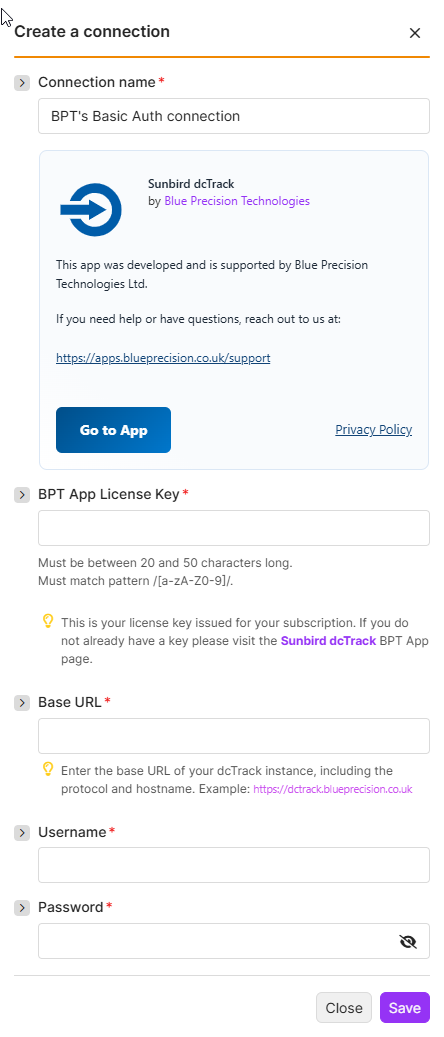
- Enter your BPT App License Key.
For more information on how to acquire an App License Key, refer to the
FAQ
page.- Enter the Base URL for your dcTrack instance.
- Enter Your Username and Password
- Click Save.
You have successfully established the connection. You can now edit your scenario and add more Sunbird dcTrack modules. If your connection requires reauthorization at any point, follow the connection renewal steps here .
Build Sunbird dcTrack Scenarios
After connecting the app, you can perform the following actions:
Location
Search Locations
Returns a list or all Locations
This module contains the following fields
| Field | Usage |
|---|---|
| Connection | Establish a connection to your Sunbird dcTrack account |
| Limit | Maximum number of returned results (bundles). |
| Filter | Set filters on Location Fields. Filters for the following:- Text - Contains, Equals, Starts with, Ends with, In List- Number - Equals, Less Than, Greater Than, In List- Boolean - Equals, Does not equal- Date and time - Equals, Before, After, In List |
| Select Columns | A Multi-choice list with the option of what column you want to see returned. Leave blank to return everything. |
Create a Location
Creates a new location.
This module contains the following fields
| Field | Usage |
|---|---|
| Connection | Establish a connection to your Sunbird dcTrack account |
| Address | Provides address information for the selected location. |
| Identity | Set the following information regarding the following:- Location Code*- Location Name*- Hierarchy Level*- Location Parent- Location Type |
| Dimension | Capture the size and spatial characteristics of the location. |
| Settings | Operational settings for power, ownership, and behavior of the location. (Advanced) |
| Notes | Free-text field for additional notes or comments about the location. |
Update a Location
Updates details of an existing location.
This module contains the following fields
| Field | Usage |
|---|---|
| Connection | Establish a connection to your Sunbird dcTrack account |
| Location* | Select the specific location. |
| Address | Provides detailed address information for the selected location. |
| Identity | Set the following information regarding the following:- Location Code*- Location Name*- Hierarchy Level*- Location Parent- Location Type |
| Dimension | Capture the size and spatial characteristics of the location. |
| Settings | Operational settings for power, ownership, and behavior of the location. (Advanced) |
| Notes | Free-text field for additional notes or comments about the location. |
Get a Location
Retrieves a specific location by its ID.
This module contains the following fields
| Field | Usage |
|---|---|
| Connection | Establish a connection to your Sunbird dcTrack account |
| Location* | A dynamic dropdown from all available location in your Sunbird dcTrack system. |
Delete a Location
Delete Location given the ID
This module contains the following fields
| Field | Usage |
|---|---|
| Connection | Establish a connection to your Sunbird dcTrack account |
| Location* | A dynamic dropdown from all available location records in your Sunbird dcTrack system. |
Sub-Location
Get all Sub-Locations of a Given Type
Retrieves sub-locations by type.
This module contains the following fields
| Field | Usage |
|---|---|
| Connection | Establish a connection to your Sunbird dcTrack account |
| Choose a Location* | A dynamic dropdown from all available location in your Sunbird dcTrack system. |
| Type of Sub-location* | Specify the type of sub-location to create. (Required) Choose from the following options:- Row- Aisle |
Get all Sub-Locations for a Location
Returns a list from the Sub-Location Hash.
This module contains the following fields
| Field | Usage |
|---|---|
| Connection | Establish a connection to your Sunbird dcTrack account |
| Choose a Location* | A dynamic dropdown from all available location in your Sunbird dcTrack system. |
Create a Sub-Location
Creates a new sub-location.
This module contains the following fields
| Field | Usage |
|---|---|
| Connection | Establish a connection to your Sunbird dcTrack account |
| Location* | Select the parent location under which the sub-location will be created. (Required) |
| Sub-Location Name* | Enter the name for the new sub-location. (Required) |
| Sub Location Type | Specify the type of sub-location to create. Available options:- Aisle- Row |
| Power Capacity | Define the power characteristics of the sub-location. |
Update a Sub-Location
Update a sub-location by ID.
This module contains the following fields
| Field | Usage |
|---|---|
| Connection | Establish a connection to your Sunbird dcTrack account |
| Location* | Select the parent location and sub-location ID to update. (Required) |
| Sub-Location Name* | Enter the name for the sub-location. (Required) |
| Sub Location Type | Specify the type of sub-location to create. Available options:- Aisle- Row |
| Power Capacity | Define the power characteristics of the sub-location. |
Delete a Sub-Location
Deletes the given sub-location
This module contains the following fields
| Field | Usage |
|---|---|
| Connection | Establish a connection to your Sunbird dcTrack account |
| Location* | Select the parent location and sub-location ID to delete. (Required) |
Make
Create a Make
Creates a new make entry.
This module contains the following fields
| Field | Usage |
|---|---|
| Connection | Establish a connection to your Sunbird dcTrack account |
| Make Name | Enter the official name of the make (manufacturer or vendor). |
| Customer Service | Provide customer service contact information. This can include a phone number, email, or URL to the support portal. |
| Technical Support | Provide technical support details. May include direct contacts, escalation numbers, or technical helpdesk URLs. |
| Account Number | Input the associated account number. This is typically used for billing or vendor reference purposes. |
| Aliases | Provide a list of alternative names or identifiers for the make. |
| Notes | Add any relevant notes or descriptive information. |
Search Makes
Search for a make using the make name and special characters.
This module contains the following fields:
| Field | Usage |
|---|---|
| Connection | Establish a connection to your Sunbird dcTrack account |
| Search Make | Enter a keyword or phrase to search for makes. |
| Limit | Set the maximum number of results to return. This numeric field defines how many results (bundles) will be retrieved. Default: 10 |
Update a Make
Updates the details of an existing make.
This module contains the following fields:
| Field | Usage |
|---|---|
| Connection | Establish a connection to your Sunbird dcTrack account |
| Make* | Select the make to update by its unique ID. |
| Make Name | Enter or update the display name of the selected make. |
| Customer Service | Provide customer service contact details. This could include an email, phone number, or URL for general support. |
| Technical Support | Enter technical support contact information. Helpful for cases involving escalations, SLAs, or infrastructure support. |
| Account Number | Enter the account number associated with the make. Used primarily for billing, vendor tracking, or CRM integration. |
| Aliases | List alternate names or common references for this make. |
| Notes | Include additional notes or internal information related to the make. Free-text field for documentation, comments, or annotations. |
Delete a Make
Delete a make given the ID.
This module contains the following fields:
| Field | Usage |
|---|---|
| Connection | Establish a connection to your Sunbird dcTrack account |
| Make* | Select the make to delete. |
Model
Get a Model
Retrieves model details by its ID
This module contains the following fields
| Field | Usage |
|---|---|
| Connection | Establish a connection to your Sunbird dcTrack account |
| Model ID* | Enter the unique ID of the model to be referenced. (Required) |
Search Models
Retrieves a list of models based on search criteria.
This module contains the following fields
| Field | Usage |
|---|---|
| Connection | Establish a connection to your Sunbird dcTrack account |
| Limit | Set the maximum number of results to return.Defines the maximum number of records (bundles) that will be retrieved in one execution. Default: 10 |
| Columns | Define the fields to return and apply optional filters to each selected field. Each column includes a nested filter configuration for more precise querying. |
| Selected Columns | Choose which model fields to return. Leave blank to return the default fields. |
Upload a Model Image
Uploads an image for a specific model.
This module contains the following fields
| Field | Usage |
|---|---|
| Connection | Establish a connection to your Sunbird dcTrack account |
| Model* | Select the model to which an image will be uploaded. |
| Name* | Provide a filename for the image. |
| Data* | Upload the actual image file data. |
Delete a Model Image
Deletes the image associated with a model.
This module contains the following fields
| Field | Usage |
|---|---|
| Connection | Establish a connection to your Sunbird dcTrack account |
| Model* | Select the model and image orientation to delete. |
Create a Model
Creates a new model.
This module contains the following fields
| Field | Usage |
|---|---|
| Connection | Establish a connection to your Sunbird dcTrack account |
| Identity | Defines the classification and vendor metadata for the model. |
| Physical Attributes | Describes the physical dimensions, weight, and rack-specific properties. |
| Version | Don’t Update Prevent this model from being overwritten during system updates.- Set Company Standard Flag this model as a company-preferred standard. (Advanced) |
| Miscellaneous | Aliases List alternative names or identifiers for the model.- Return Details Toggle to return detailed metadata after model creation.- Proceed On Warning Continue processing even if validation warnings are present (Advanced) |
| Power Supply | power ports with labels, connector types, orientation (Front/Back), and placement (X/Y). (Advanced) |
| Data | Define data ports (Advanced) |
| Slot | Define slot layout per face (Front/Back). Max 2 faces allowed. (Advanced) |
Update a Model
Updates details of an existing model.
This module contains the following fields
| Field | Usage |
|---|---|
| Connection | Establish a connection to your Sunbird dcTrack account |
| Model* | Select the specific model you want to update by its unique ID. |
| Identity | Defines the classification, make, and model name for the model. |
| Physical Attributes | Describes the model dimensions, weight, rack units, mounting, and form factor. |
| Version | Don’t Update Prevent this model from being overwritten during system updates.- Set Company Standard Flag this model as a company-preferred standard. (Advanced) |
| Miscellaneous | Aliases List alternative names or identifiers for the model.- Return Details Toggle to return detailed metadata after model update.- Proceed On Warning Continue processing even if validation warnings are present. (Advanced) |
| Power Supply | Define power ports, redundancy, and auto power budget settings. (Advanced) |
| Data | Define data ports for the model. (Advanced) |
| Slot | Define chassis faces and slot layout per face. Max 2 faces allowed. (Advanced) |
Delete a Model
Delete a model using the model ID.
| Field | Usage |
|---|---|
| Connection | Establish a connection to your Sunbird dcTrack account |
| Model* | Select the specific model you want to delete by its unique ID. |
Items
Create an Item
Creates a new item.
This module contains the following fields
| Field | Usage |
|---|---|
| Connection | Establish a connection to your Sunbird dcTrack account |
| Hardware | Provide hardware details including the make and model of the item. |
| Identity | Define identifying information for the item. |
| Placement | Specify where the item is physically placed in your environment. |
| Miscellaneous | (Advanced) Additional configuration options for specialized cases. |
Update an Item
Updates details of item.
This module contains the following fields
| Field | Usage |
|---|---|
| Connection | Establish a connection to your Sunbird dcTrack account |
| Hardware | Provide hardware details including the make and model of the item. |
| Identity | Define identifying information for the item. |
| Placement | Specify where the item is physically placed in your environment. |
| Miscellaneous | Additional configuration options for specialized cases. (Advanced) |
Search Items
Searches for items using filters.
This module contains the following fields
| Field | Usage |
|---|---|
| Connection | Establish a connection to your Sunbird dcTrack account |
| Limit | Set the maximum number of results to return.Defines the maximum number of records (bundles) that will be retrieved in one execution. Default: 10 |
| Columns | Define the fields to return and apply optional filters to each selected field. Each column includes a nested filter configuration for more precise querying. |
| Set Custom Field by Label | When filtering on Custom Fields, if the Label of the Custom Field is numeric, you must include ‘customFieldByLabel’: true in the Request payload. If this column is not included, dcTrack will treat the label as the Custom Field ID. (Advanced) |
Get an Item
Retrieves an item by its unique ID.
This module contains the following fields
| Field | Usage |
|---|---|
| Connection | Establish a connection to your Sunbird dcTrack account |
| Item ID* | Enter the unique ID of the items. (Required) |
Delete an Item
Deletes an item.
| Field | Usage |
|---|---|
| Connection | Establish a connection to your Sunbird dcTrack account |
| Item ID* | Select the item to delete using its unique ID. |
| Set to Proceed on Warning | Determine whether to continue even if warnings occur. |
Other
Make an API Call
Performs an arbitrary authorized API call.
This module contains the following fields
| Field | Usage |
|---|---|
| Connection | Establish a connection to your Sunbird dcTrack account |
| URL* | Enter a path relative to https://{{hostname}}/api/v2/authentication/login. For example: /v2/makesFor the list of available endpoints, refer to the Sunbird dcTrack support
page
. |
| Method* | Select the HTTP method you want to use:GET to retrieve information for an entry.POST to create a new entry.PUT to update/replace an existing entry.PATCH to make a partial entry update.DELETE to delete an entry. |
| Headers | Enter the desired request headers. You don’t have to add authorization headers; we already did that for you. |
| Query String | Enter the request query string. |
| Body | Enter the body content for your API call. |